
UTM Tracker
Version1.7.0
Compatibility^3.0.0
Categorymarketing-seo
Downloads316 monthly
Last updatedSep 17, 2026
This plugin aims to fix over attribution when you use multiple different marketing platforms, by connecting UTM parameters directly to orders.
When using multiple marketing platforms, each platform has their own attribution model, and each doesn't know what the other already attributed. This can lead to over attribution, or double-attribution. This means your ROAS or ROI might look better than it actually is.
This plugin connects UTM parameters directly to orders, so that attribution can never exceed the actual value of an order. This might lead to slight under-attribution, but never to over attribution.
Getting started
- Add the plugin to your
vendure-config.ts
Ts
Set attributionModel: new NoopAttribution() to retain tracking parameters without attributing order value. The attributed percentage and value remain null after order placement, and the UTM attribution table displays - for the attributed value.
- Generate and run a database migration for the plugin entities. Upgrading from a version before 1.7.0 requires an additive nullable
clidcolumn onutm_order_parameter; existing rows remain valid with a null client ID. Review the generated migration before running it.
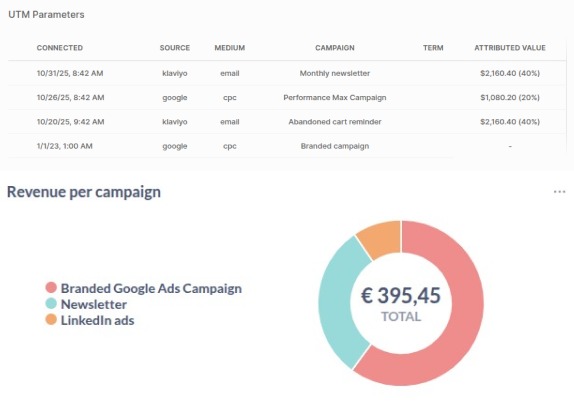
The React order detail extension displays two tables. UTM attribution keeps the campaign display name and attributed value view. UTM Parameters shows the raw Connected, Source, Medium, Campaign, Term, Content, and Client ID values for every retained parameter set. Missing values display -. No Admin UI compilation step is needed, but this plugin doesn't include diagrams or charts. Use your own data visualization or BI tool for further analysis.
Enable UTM parameters in your marketing tools
Most platforms like Klaviyo or Google Ads allow you to automatically add UTM parameters to your campaigns. This is needed to extract the parameters on your storefront.
Storefront usage
To add parameters to an order, you can use the addUTMParametersToOrder mutation:
Graphql
Example variables:
Json
clid is optional and can be supplied with UTM values or by itself. connectedAt remains required for every parameter set.
Keep in mind that UTM parameters can only be added to an active order! On most page visits, an active order is not present yet, so you should save the parameters in a cookie or local storage, along with the connectedAt date, and add them to the order when the order is created. You should not create a new order for each page visit, because this drastically increase the amount of orders in your database (Most visitors will never create an order, so this is a waste of resources).
You should do something like this in your storefront:
Js
`utm-util.js` file
Js
Insights and visualizations
This plugin doesn't include any visualization by default, but you can easily write your own insights with SQL. For example, this query will give you the total attributed revenue per source:
Sql
You can use different GROUP BY clauses to get the total attributed revenue per medium, campaign, term, content, etc.
Changelog
- Added optional client-ID (
clid) tracking through the Shop and Admin APIs. - Added
NoopAttributionfor collecting tracking parameters without attributing order value. - Added a raw UTM Parameters table and titled the existing dashboard table UTM attribution.
- Migrated to React Dashboard
- Upgraded to Vendure 3.6.3
- Upgraded to Vendure 3.5.3
- Fix type error in
getCampaignDisplayName - Fixed typo in UI
- Allow setting a custom display name for a campaign.
- Documentation update
- Updated official documentation URL
- Added UI to view UTM parameters on the order detail page.
- Added U-Shaped Attribution model.
- Reversed orders of UTM parameters in API: Most recent parameters are now first.
- Add
utm-util.jsfile to the README.md
- Allow adding bulk UTM parameters to an order, and de-duplicate parameters on the backend.
- Allow passing
connectedAtdate from client, because UTM parameters are saved on the client first
- Initial release