Email & Notifications
A typical ecommerce application needs to notify customers of certain events, such as when they place an order or when their order has been shipped. This is usually done via email, but can also be done via SMS or push notifications.
Email is the most common way to notify customers of events, so a default Vendure installation includes our EmailPlugin.
The EmailPlugin by default uses Nodemailer to send emails via a variety of different transports, including SMTP, SendGrid, Mailgun, and more. The plugin is configured with a list of EmailEventHandlers which are responsible for sending emails in response to specific events.
This guide will cover some of the main concepts of the EmailPlugin, but for a more in-depth look at how to configure and use it, see the EmailPlugin API docs.
Here's an illustration of the flow of an email being sent:
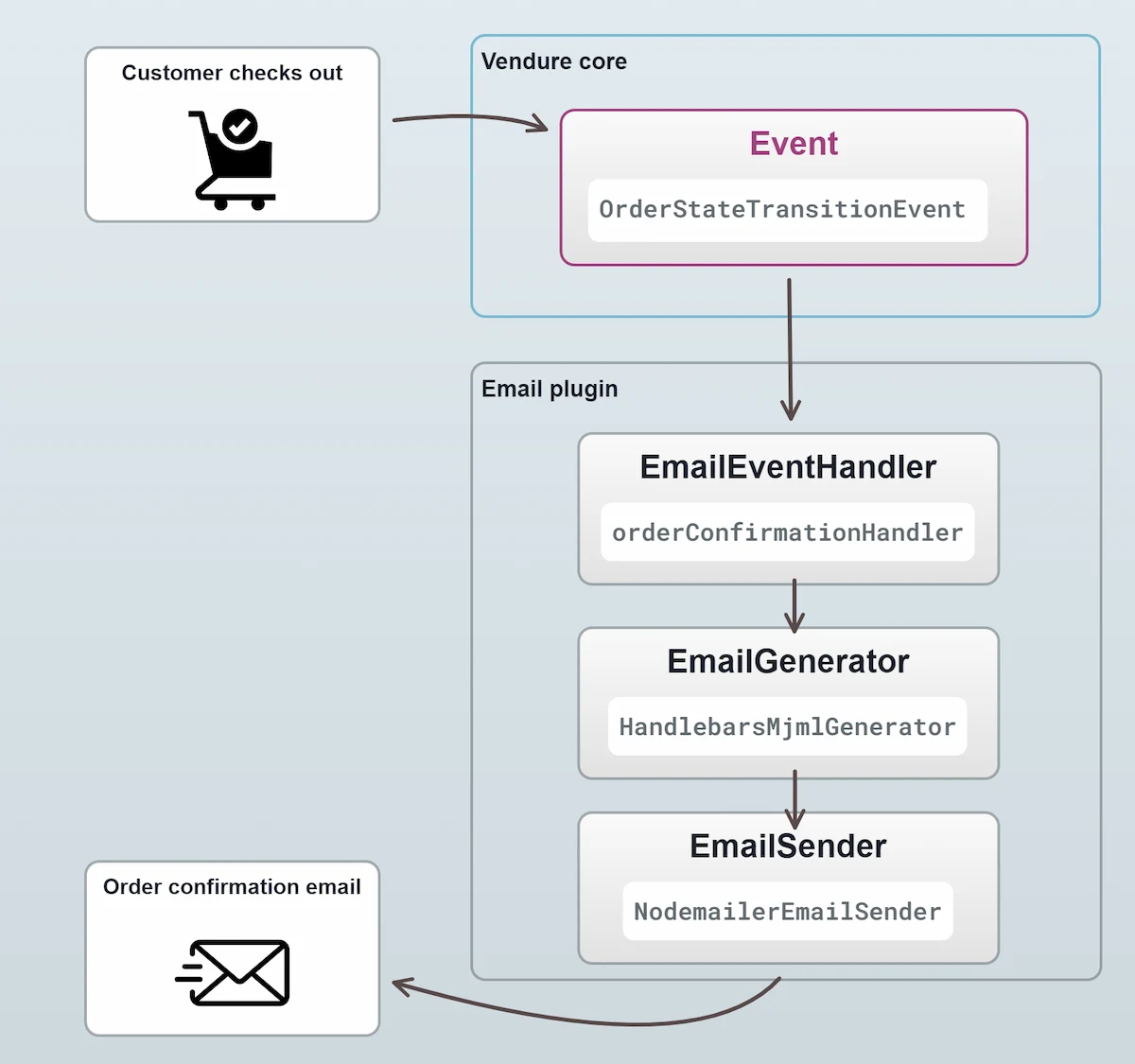
All emails are triggered by a particular Event - in this case when the state of an Order changes. The EmailPlugin ships with a set of default email handlers, one of which is responsible for sending "order confirmation" emails.
EmailEventHandlers
Let's take a closer look at a simplified version of the orderConfirmationHandler:
To recap:
- The handler listens for a specific event
- It optionally filters those events to determine whether an email should be sent
- It specifies the details of the email to be sent, including the recipient, subject, template variables, etc.
The full range of methods available when setting up an EmailEventHandler can be found in the EmailEventHandler API docs.
Email variables
In the example above, we used the setTemplateVars() method to define the variables which are available to the email template.
Additionally, there are global variables which are made available to all email templates & EmailEventHandlers. These are
defined in the globalTemplateVars property of the EmailPlugin config:
Email integrations
The EmailPlugin is designed to be flexible enough to work with many different email services. The default configuration uses Nodemailer to send emails via SMTP, but you can easily configure it to use a different transport. For instance:
Other notification methods
The pattern of listening for events and triggering some action in response is not limited to emails. You can use the same pattern to trigger other actions, such as sending SMS messages or push notifications. For instance, let's say you wanted to create a plugin which sends an SMS message to the customer when their order is shipped.
This is just a simplified example to illustrate the pattern.