Database migrations are needed whenever the database schema changes. This can be caused by:
TypeORM (which Vendure uses to interact with the database) has a synchronize option which, when set to true, will automatically update your database schema to reflect the current Vendure configuration. This is equivalent to automatically generating and running a migration every time the server starts up.
This is convenient while developing, but should not be used in production, since a misconfiguration could potentially delete production data. In this case, migrations should be used.
A fresh project created with @vendure/create ships with an initial migration that creates the entire database schema. This matters for production: the first time you deploy against a new, empty database the schema is created by running migrations, so you never need to enable synchronize — not even for the first deploy.
Without an initial migration, a fresh deployment against an empty database would start with no tables at all, because synchronize is (correctly) disabled. Shipping the initial migration is what makes the first deploy work.
generateMigration compares your configuration against the schema of the currently configured database. Run it against a database that already contains the schema and it finds no differences, so it cannot produce an initial migration. This is a problem if you have an existing project with no initial migration and need to create one.
For this case, use the --from-empty flag:
Run npx vendure migrate --generate initial --from-empty
Instead of diffing against your configured database, --from-empty diffs your configuration against a temporary, empty "shadow" database of the same type, producing a complete migration that recreates the whole schema from scratch. This is the same approach used by tools such as Prisma and Atlas.
For PostgreSQL and MySQL/MariaDB, --from-empty creates and drops a temporary database on the same server, so the configured database user must have permission to create databases. For SQLite an in-memory database is used.
This section assumes a standard Vendure installation based on @vendure/create.
Let's assume you have defined a new "keywords" custom field on the Product entity. The next time you start your server you'll see a message like this:
Since we have synchronize set to false, we need to generate a migration to apply these changes to the database. The workflow for this is as follows:
Run npx vendure migrate and select "Generate a new migration"
This will have created a new migration file in the src/migrations directory. Open this file and check that it looks correct. It should look something like this:
The up() function is what will be executed when the migration is run. The down() function is what will be executed if the migration is reverted. In this case, the up() function is adding a new column to the product table, and the down() function is removing it.
The exact query will depend on the database you are using. The above example is for PostgreSQL.
Assuming the migration file looks correct, the next time you start the server, the migration will
be run automatically. This is because the runMigrations function is called in the src/index.ts file:
It is also possible to run the migration manually without starting the server:
Run npx vendure migrate and select "Run pending migrations"
TypeORM will attempt to run each migration inside a transaction. This means that if one of the migration commands fails, then the entire transaction will be rolled back to its original state.
However this is not supported by MySQL / MariaDB. This means that when using MySQL or MariaDB, errors in your migration script could leave your database in a broken or inconsistent state. Therefore it is critical that you first create a backup of your database before running a migration.
You can read more about this issue in typeorm/issues/7054
Now we'll dive into what's going on under the hood.
Vendure exposes a some helper function which wrap around the underlying TypeORM migration functionality. The reason for using these helper functions rather than using the TypeORM CLI directly is that Vendure generates additional schema information based on custom fields and plugin configurations which are not available to the TypeORM CLI.
In a standard Vendure installation prior to v2.2.0, you'll see the following migration script in your project root directory.
Running the vendure migrate command also uses a very similar script internally.
and a set of scripts in your package.json file:
When running and reverting migrations, Vendure is looking for migration files in the directory specified by the dbConnectionOptions.migrations option is set in your VendureConfig:
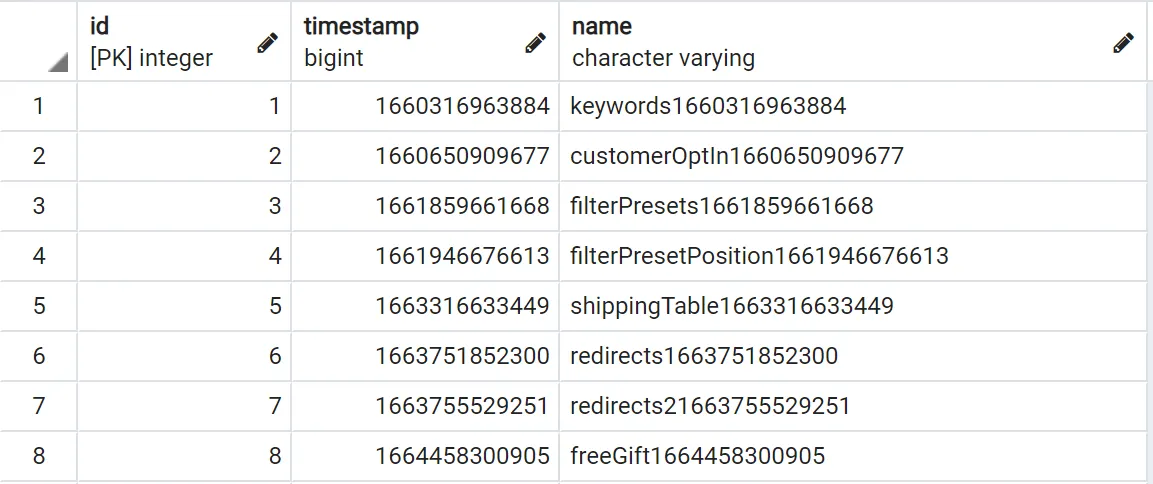
TypeORM keeps track of which migrations have been run by creating a new migrations table in your database, and each time a migration is successfully run
it adds a row to this table with the name of the migration class and a timestamp. This prevents the same migration from being run twice, and also allows
TypeORM to know which migration to revert when the revertLastMigration function is called.
These are the underlying function exposed by Vendure which are used to generate, run and revert migrations:
The revertLastMigration function will revert the last applied migration by applying the down() method. If run again it will then revert the one before that, and so on.
In doing so, it will also remove the corresponding row from the migrations table.
Architecture reviews, custom plugin work, migrations, ongoing support. Get a hand from the team that builds Vendure.
Talk to the team